
What Is a Catch-All Email? Meaning, Examples and Risks

That one behaviour is why catch-all domains are a headache for anyone sending cold email. The server never tells you no, so you cannot tell a real person's inbox from a typo or a guess.
This guide sticks to the basics: what a catch-all email means in plain terms, why companies use one, how it works at the server level and why verification tools mark it as risky. If you already know the theory and want to check your own list, go to catch-all email verification.
Catch-all email meaning, in plain English
Most mail servers check the recipient before they accept a message. If you send to jane@company.com and Jane has a mailbox, the server accepts. If there is no Jane, the server rejects the message and you get a bounce.
A catch-all server skips that check. It accepts mail for every address on the domain. What happens next depends on how the company set it up:
- The message lands in a shared "catch-all" inbox that someone may or may not read.
- The message is forwarded to an admin or a general address.
- The message is accepted and then quietly deleted.
- The message is accepted now and bounced later, once an internal system finds no matching user.
From the sender's side, all four look the same at the moment of sending. The server accepted it. That is all you know.
A catch-all email example
Say Alice works at company.com and her real address is alice@company.com. You mistype it as alize@company.com.
- On a normal domain, the server checks for a mailbox called alize, finds none, and rejects the message with a 550 5.1.1 "user unknown" reply. You get a bounce and you know the address is wrong.
- On a catch-all domain, the server accepts alize@company.com without checking. The message goes to the catch-all inbox, gets forwarded, or disappears. You get no bounce, so you never learn about the typo.
The same goes for an address nobody ever had, like qz81test@company.com. A catch-all domain accepts that too.
Why companies set up a catch-all
Companies usually turn on catch-all for practical reasons, not to annoy senders:
- Typos and misspellings. A customer writes to jon@ instead of john@. The catch-all makes sure the message still arrives somewhere.
- Former employees. Mail sent to people who left still reaches the company instead of bouncing.
- Old or informal addresses. Addresses printed on old business cards or forms keep working.
- Fewer missed leads. Some small teams prefer to see everything sent to the domain.
The trade-off is spam. A catch-all inbox also collects junk sent to made-up names, and anyone verifying addresses on the domain will see it as catch-all. For the sender side, our help article explains how Mailsfinder handles catch-all results.
How a catch-all works at the SMTP level
Email verification, at its core, is a short conversation with the recipient's mail server over SMTP, the protocol defined in RFC 5321. A verifier connects to the server, says who it is, names a sender, and then names the recipient with the RCPT TO command. It stops before sending any actual message.
The server answers with a reply code:
- 250 means the server accepts the recipient.
- 550 (often with enhanced code 5.1.1) means the mailbox does not exist. That is a permanent rejection.
- 4xx codes, such as 450 or 451, mean "try again later". These are temporary.
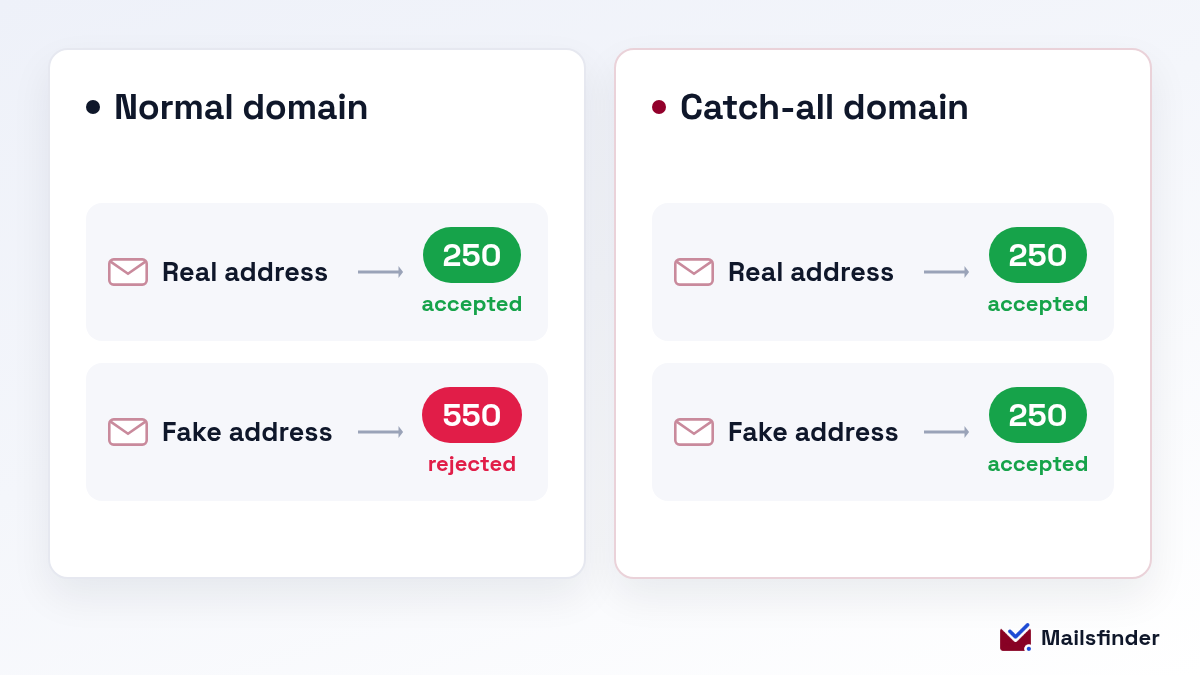
On a normal domain, a fake address gets a 550 and a real one gets a 250. That difference is what lets a verifier sort valid from invalid.
On a catch-all domain, every address gets a 250. The real mailbox, the misspelled one and a random string of letters all get the same answer. The verifier has nothing to compare. That is why verifiers, including a standard email verifier, mark these addresses as catch-all or risky instead of valid. A verifier spots the pattern when the server says yes to an address that plainly should not exist. For a specific address on a domain like that, the free catch-all checker checks addresses on catch-all domains.
Why catch-all emails are a problem for cold outreach
A catch-all result is not "invalid" and it is not "valid". It is "unknown". That grey zone causes three problems.
1. Hidden bounces. Some catch-all servers accept your message during the SMTP session and send a bounce back later. Those delayed bounces still count against your sending reputation, and you only find out after the damage is done.
2. Messages that go nowhere. If the server accepts and deletes, there is no bounce at all. Your campaign looks healthy, but nobody read the email. Your reply rate drops and you cannot see why.
3. Guessed addresses look the same as real ones. If you built a list by guessing formats like first.last@ or firstinitiallast@, a catch-all domain will accept every guess. The server reply alone cannot tell you which guess is right.
None of this means you should throw catch-all leads away. On B2B lists, catch-all domains are common, and the people behind them are often exactly who you want to reach. You just need to handle them differently.
Can a catch-all address be a spam trap?
It can. A spam trap is an address that exists only to catch senders with poor list habits. Nobody uses it to sign up for anything, so any mail it receives came from a list that was guessed, scraped or bought.
A domain that accepts every address is a convenient place for a trap, and an old domain that has been taken over can be set to accept all mail too. When you guess addresses on a catch-all domain, you have no way of knowing whether you hit a real person or a trap. Hitting traps can hurt your sender reputation even when nothing bounces.
The fix is the same as for catch-all leads in general: prefer found addresses over guessed ones, send small, and remove addresses that never open or reply.
Catch-all vs valid vs invalid: what each status means
| Status | What the server said | What it means for you |
|---|---|---|
| Valid | Accepted a real address and rejected a fake one | The mailbox exists. Safe to send. |
| Invalid | Rejected the address (5xx) | The mailbox does not exist. Remove it. |
| Catch-all (accept-all) | Accepted every address, real or fake | The domain takes all mail. The specific mailbox is unconfirmed. |
| Unknown | No clear answer, timeout, or temporary error | Try again later before deciding. |
Catch-all vs alias vs forwarding address
These three get mixed up a lot because they all send mail somewhere other than a personal inbox.
- An alias is an extra name for one existing mailbox. sales@company.com might deliver straight to Jane's inbox. The alias is a real, defined address.
- A forwarding address is a real address that passes its mail on to another address, often at a different provider.
- A catch-all is a rule for the whole domain. It accepts mail for any address that is not defined at all, including typos and made-up names.
The difference matters for verification. A domain with aliases and forwarding but no catch-all still rejects addresses that do not exist, so a verifier can tell real from fake. A catch-all domain accepts everything, so it cannot.
Catch-all email vs role-based email
People often mix these two up, but they are different things.
A catch-all is a setting on the whole domain. It decides what the server does with mail for any address, including ones that do not exist.
A role-based email is a single, real address that belongs to a job or team instead of a person. Think info@, sales@, support@ or hello@. The mailbox exists, but it is often shared, and replies tend to be slower or come from whoever is on duty.
A domain can have both. A role-based address on a catch-all domain will pass any check, and a personal address on a normal domain may fail if it is wrong. When you build a cold outreach list, aim for a named person's confirmed address first. Use role-based addresses only when no personal contact is available.
Where to go from here
You now know what a catch-all email is and why it sits in a grey zone. The short version: the domain takes all mail, so the server's reply cannot confirm a person behind any one address. Treat these addresses as unconfirmed, not as good or bad.
When you are ready to check a list, catch-all email verification checks addresses on catch-all domains. For a side-by-side look at tools built for this, see our roundup of the best catch-all verifiers.
Check catch-all emails with Mailsfinder
Mailsfinder finds and verifies business emails in one place. You can check a single address for free with the catch-all checker, or run your list through catch-all email verification to check addresses on catch-all domains.
The free plan gives you 100 credits a day, so you can try it on real leads before paying. When you need more, Starter is $9.99 a month for 75,000 credits, or you can buy 1,000,000 credits once for $249.
Frequently asked questions
What is a catch-all email in simple terms?
expand_more
Is a catch-all email address valid?
expand_more
Are catch-all emails safe?
expand_more
What does "accept-all" mean in an email verification result?
expand_more
Should I send emails to catch-all addresses?
expand_more
Do catch-all emails bounce?
expand_more
Is a catch-all the same as an alias?
expand_more
About the author
Harsh Shah
Founder, Mailsfinder
Harsh founded Mailsfinder after running outbound for hundreds of B2B teams and watching the same gap repeat: tools that generate sends but not replies, SEO that generates traffic but not pipeline. He currently consults for ClickUp and three other B2B SaaS companies on pipeline-driven SEO and outbound, and previously led growth at Databox and Darwinbox. Across 50+ B2B SaaS engagements he scaled one platform from $2K to $50K MRR through organic search, drove 35% traffic lifts via content audits, and launched comparison pages with 22% conversion lift.
Expertise: Pipeline-driven SEO and AEO, first-principles outbound, B2B SaaS growth consulting, email deliverability, comparison and alternative page SEO
Check addresses on catch-all domains before you send
Check a single address free, then run your catch-all segment through catch-all email verification before you hit send.